Turn source material into usable work

Syntable takes recordings, PDFs, videos, and text, and turns them into a reading workspace you can review, edit, revisit, and build on.

Syntable workspace preview
How it works

How it works

Start with source material. Open a usable reading workspace first. Generate more from it when needed.

01

Add a source

Upload a PDF, paste a YouTube link, record audio, or start from text.

Youtube
PDF import
Audio
Synthesize Workspace
02

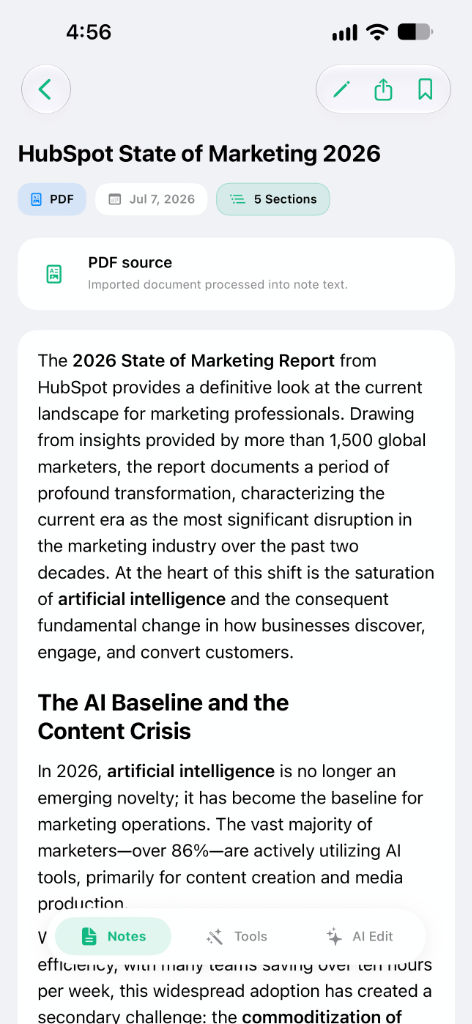
Open a reading workspace

Syntable turns the source into a reading workspace where you can read, review, copy, edit, and keep working with the content.

Reader Intro to Quantum Mechanics

Section 03

Superposition and state vectors

The principle of superposition states that any two or more quantum states can be added together to yield another valid quantum state.

Mathematically, it refers to a property of solutions to the Schrödinger equation; since the equation is linear, any linear combination of solutions will also be a solution.

This means that a physical system—such as an electron—exists partly in all its particular theoretically possible states simultaneously before it is measured.

03

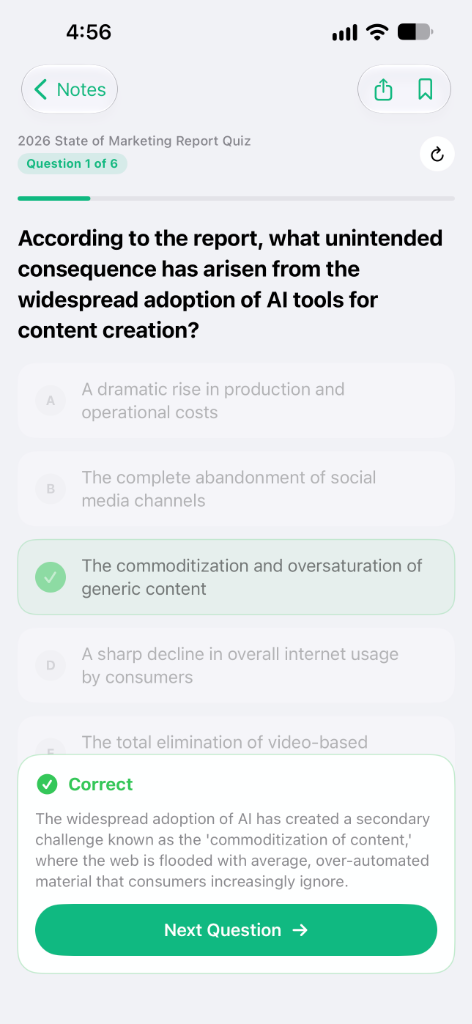
Generate from the reading workspace

Create summaries, quizzes, flashcards, and written outputs from the same reading workspace when you need them.

Cards Generate from workspace

Quantum Physics

Study your main concepts

What does mathematical superposition refer to?

Tap to flip
1 / 12
04

Export the result

Take your work out as PDF, EPUB, TXT, or DOCX.

Export Export result
Ready

Preview

Physics notes

Chapter 3 explores the core tenets of quantum mechanics...

EPUB
PDF Share
DOCX Edit
EPUB
TXT Plain
Export EPUB
Start with a reading workspace you can use

Start with a reading workspace you can use

Every source becomes a reading workspace you can review, edit, revisit, and use as the base for everything that comes next.

Reading Workspace Interface
01

Readable

Open the content in a format you can actually work with instead of going back to the raw source.

02

Editable

Adjust, refine, or update the material before generating anything else from it.

03

Reusable

Use the same reading workspace as the base for studying, writing, or exporting later.

04

Persistent

Come back to the same reading workspace instead of starting over from the source each time.

Generate what you need from the reading workspace

Generate what you need from the reading workspace

Once the reading workspace is ready, you can turn it into different formats depending on the task.

01
Summaries

Get the core ideas in a shorter, clearer format.

02
Flashcards

Turn dense material into review cards.

03
Quizzes

Check what you understood and what still needs work.

04
Written outputs

Reuse the same reading workspace as a structured draft or article.

Exports

Keep the result in a format you can use

Export your work in the format that fits what comes next.

PDF .

for reading and sharing

EPUB .

for long-form reading

TXT .

for plain text portability

DOCX .

for editing and collaboration

Read it, share it, edit it, or keep working on it outside Syntable.

Useful across different kinds of work

Useful across different kinds of work

Study .

Study from lectures and reading

Turn source material into a reading workspace you can review, then generate summaries, quizzes, and review cards from it.

Meetings .

Review meetings and recorded conversations

Keep recordings in a reading workspace you can revisit later, then extract what you need from the same place.

Writing .

Write from source material

Start from a video, transcript, or document, work from the reading workspace, and turn it into a structured draft.

Simple pricing for trying it free or using it fully

Simple pricing for trying it free or using it fully

Start with a limited free plan, or move to Pro for the complete workflow and more consistent daily use.

Free

$0
forever

For trying the product before moving into regular use.

Start free
  • Unlimited manual notes
  • Limited AI tools
  • Limited source processing
  • Basic reading workspace access
  • Limited summaries, flashcards, and quizzes
  • Export in PDF, EPUB, TXT, and DOCX
Generous Limits
  • 1 YouTube video / day
  • 10 PDFs / day
  • 3 audio uploads or recordings / week
  • 50 chat messages / day
Recommended

Pro

$12
per month, billed monthly

For daily use with the full workflow in one plan.

Get Pro
  • Upload from every supported source type
  • Use the full reading workspace workflow
  • Generate summaries, flashcards, and quizzes without free-plan bottlenecks
  • Chat with your content as part of the regular workflow
  • Export in every available format
  • Built for regular study, review, and writing

For institutions

$10
/ seat, starting at 20 seats

If you need access for a university, cohort, academy, or student group, we can offer a custom setup for multi-user access and volume pricing.

Get Started
  • Volume-based access
  • Student or team rollouts
  • Custom agreements when needed
  • Flexible seat planning
FAQS

Frequently
asked
questions

What is Syntable and how does it help with my study or work notes?

Syntable is an AI-powered platform that turns your source materials—like recordings, PDFs, videos, and text—into an interactive reading workspace. It helps you review, edit, and generate comprehensive study notes and documents without starting from scratch.

Can I turn a YouTube video into notes or study materials?

Yes! You can paste a YouTube link directly into Syntable. We will process the video and extract the transcript, turning it into a structured reading workspace where you can generate summaries, quizzes, and flashcards.

How do I extract summaries and flashcards from PDF documents?

Simply upload your PDF file to Syntable. The platform converts the document into a readable format, allowing you to highlight key concepts and automatically generate review cards or concise summaries for faster studying.

What other types of files and sources are supported?

Beyond PDFs and YouTube links, Syntable supports direct text input and uploaded audio files. You can even record audio directly on the platform to capture lectures or meetings and turn them into usable notes.

What kind of learning materials can I generate from my workspace?

From any source, Syntable can instantly generate detailed summaries, interactive flashcards for spaced repetition, and custom quizzes to test your knowledge on specific topics.

Can I edit the generated materials before exporting them?

Absolutely. Syntable creates a persistent reading workspace where you have full control to adjust, refine, or update the material before generating any final output or exporting it.

What file formats are available for exporting my work?

You can export your results in a variety of widely-used formats, including PDF for easy sharing, EPUB for long-form reading, TXT for plain text portability, and DOCX for further editing and collaboration.

Is there a free plan available to try the app?

Yes, Syntable offers a Free plan that allows you to try the product. It includes unlimited manual notes, basic reading workspace access, and limited daily usage of AI tools like source processing, summaries, and flashcards.

What are the benefits and limits of the Syntable Pro subscription?

The Pro subscription is designed for daily use and completely unlocks the workflow. It removes free-plan bottlenecks, allowing you to upload from all supported source types, generate unlimited study materials, and chat with your content seamlessly.

Is Syntable built only for studying or can it be used for professional work?

Syntable is highly versatile. While it's excellent for students preparing for exams, professionals use it to review recorded meetings, organize research material, and draft structured articles or reports effortlessly.

Does Syntable offer volume pricing or team access for institutions?

Yes! We offer custom setups for universities, cohorts, academies, or student groups. This includes multi-user access, flexible seat planning, and volume-based pricing. Reach out to our team for more details.

How does the AI Chat feature work within the reading workspace?

The AI Chat serves as your interactive learning assistant. You can ask specific questions about your uploaded documents, videos, or audio files right from the reading workspace, helping you find answers fast without skimming through the original source.

Start using Syntable

Start with a source. Keep building from the reading workspace.

Footer Image
Copyright © 2026 Syntable